Grounded in your input
Your context and goal guide the result. If you add photos, visible subjects, mood, setting, and style help make the suggestions more concrete.
AI biography Generator
Add context, optionally upload a photo set and get a creator profile with ready-to-copy Instagram and TikTok bio options.
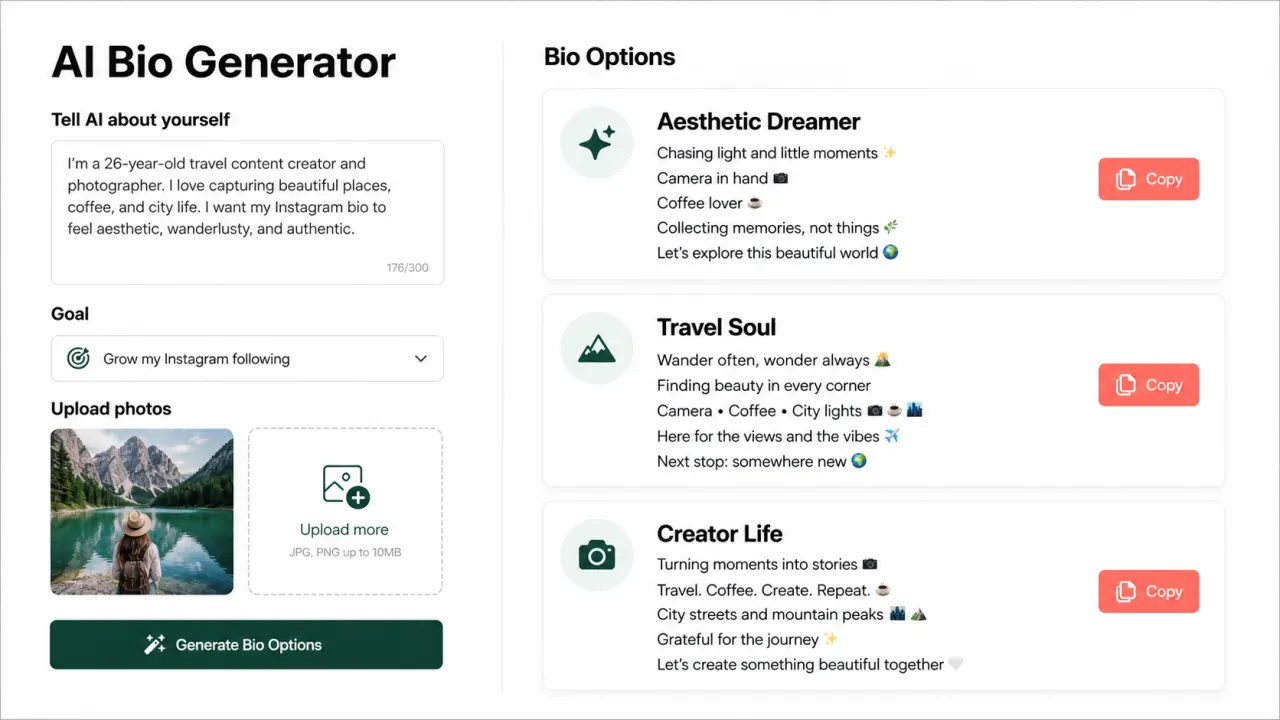
Give the AI a little ground truth before it reads the images.
A better way to introduce yourself
An AI bio generator helps you turn the details of a real person into a short, memorable profile introduction. Instead of assembling a few disconnected labels or copying a quote that thousands of accounts already use, you give the tool useful context about who you are. Socionar can work from your description, goal, optional photos, or a combination of all three. It creates several voices so you can choose the one that feels natural.
Social profiles leave very little room to make that first impression. A visitor might decide in seconds whether your page feels relevant, interesting, funny, creative, or trustworthy. The best bio is a compact signal: a few lines that reveal your world and give people a reason to look at the next post. That might mean Tokyo photography, late-night gaming, weekend travel, daily training, music, design, or an attitude that is unmistakably yours.
Socionar is built to help with that small but surprisingly difficult piece of writing. When you upload photos, the tool looks for visual patterns such as setting, mood, color, interests, and aesthetic cues. Text-only mode can also create a profile from what you choose to share. The goal is to find specific, usable language from the information available, not to make broad claims about your identity.
Every suggestion is still yours to review. Keep the lines you love, remove anything that feels too personal, and adjust words until they sound like you. Think of the generator as a creative starting point rather than a label. You stay in control of the final impression and the details you publish.
Useful by design
A good bio should sound specific to the person using it. Socionar combines the details you choose to share with optional visual signals, then gives you several editable directions instead of treating one draft as the final answer.
Your context and goal guide the result. If you add photos, visible subjects, mood, setting, and style help make the suggestions more concrete.
Multiple tones give you room to compare, combine, and rewrite. You decide which details belong on your profile and which ones stay private.
Uploaded photos are processed for the generation request, not published as profile content or kept as a permanent gallery. Read the Privacy Policy for details.
From blank page to ready-to-paste
You do not need a writing brief or a polished personal brand statement. A few truthful details are enough. The process is designed to keep the creative decision with you while making the slow first draft much easier.
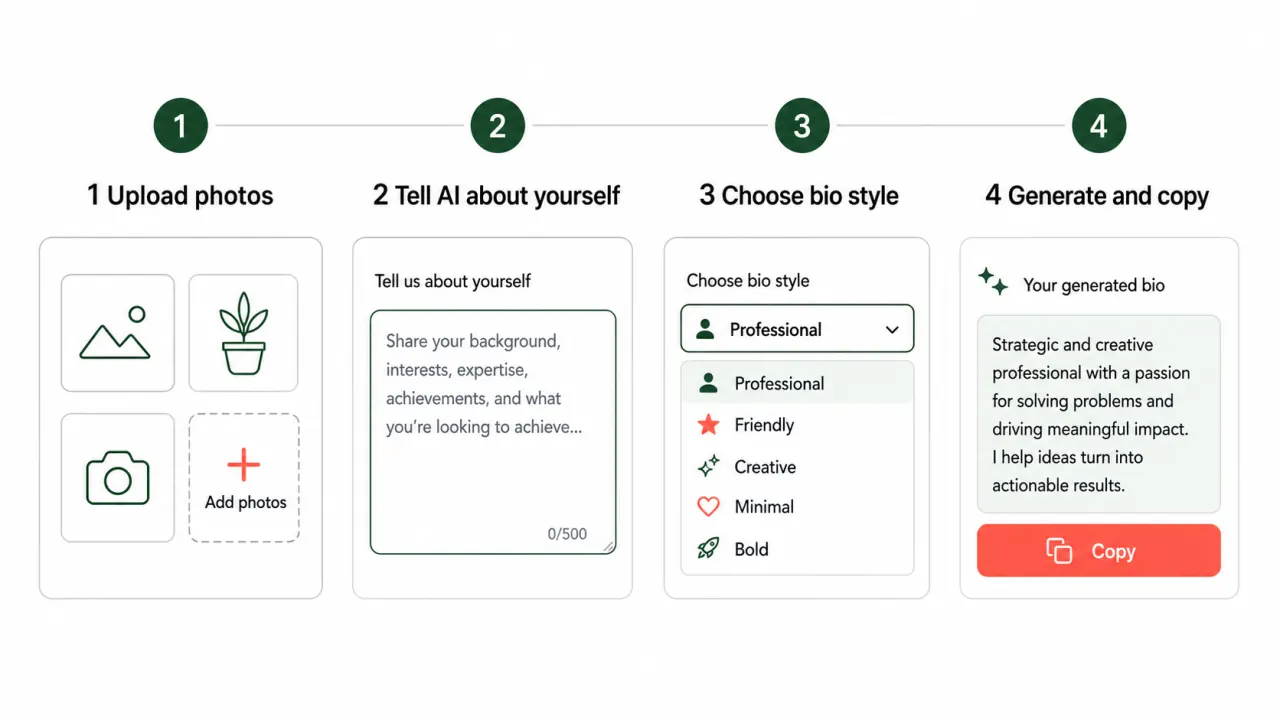
Add up to five photos that reflect your interests, outfits, work, favorite places, or visual style. Photos are optional, so you can also begin with words alone. Varied moments usually give the AI more useful signals than several similar selfies.
Share a few honest details: what you do, where you live, what you enjoy, or the energy you want. Choose a goal such as growing followers, finding clients, sharing your lifestyle, or promoting a business.
Select Instagram Style for expressive lines with personality and emoji, or Classic Description for clean natural language. You can also preview Unicode font styles without asking the AI to rewrite the bio.
Generate distinct bios, compare each version, and copy the one that feels most like you. Try another format or font instantly, then paste the finished text into the profile you want to refresh.
For better bio options, write context that is concrete but not overloaded. “I am a photographer in Tokyo who loves quiet cafés and neon streets” gives the system more to work with than “I am creative.” You can also describe the tone you want, such as playful, low-key, bold, elegant, sarcastic, or professional. There is no need to write sensitive information, and you should only upload images you are comfortable using for this purpose.
Once the bios appear, read them as a profile visitor would. Is the main idea clear at a glance? Does the humor sound like you? Are the emoji helping the rhythm, or would one less feel cleaner? The fastest route to a great result is often to copy the strongest option and make one small personal edit. An Instagram bio generator can solve the starting problem, while your final touch makes the result feel lived-in.
A feel for the output
These examples show how a few recognizable details can become a compact social profile. Actual results change with the context, goal, photos, format, and font style you choose.
📸 Framing Tokyo after dark 🌃 Quiet streets, loud stories ☕ Coffee before the next shot
✈️ Somewhere between plans 🌍 Collecting places, not things 🌅 Here for the golden hour
💪 Training with intention 🎧 Heavy playlists, clear mind ⚡ Showing up every day
Examples are illustrative and are not endorsements, customer profiles, or guaranteed outputs.
One identity, different profile moments
The same person may need a different introduction on every platform. Your interests stay consistent, but the pace, audience, and expectations change. Use each generated bio as flexible material, then tune it to the place where it will live.
Make your first impression clear before someone scrolls your grid. A strong Instagram bio can combine identity, interests, location, and personality in a few scan-friendly lines. Keep the phrases that match the visual story in your posts. After the AI bio generator shapes the message, subtle font styles can add visual personality without making the Instagram bio harder to read.
TikTok profiles move fast, so recognizable energy matters. Choose a bio that sounds natural next to your videos, whether you post comedy, photography, fitness, gaming, travel, music, or everyday observations.
On X, a bio works well when it mixes useful context with one memorable point of view. Reuse an option, remove line breaks, and add a topic that tells visitors what you post.
For LinkedIn, start with Classic Description and choose the most grounded version. Find concise language for your role, specialty, and interests, then review the result for professional accuracy.
You can also use these ideas for creator pages, portfolio introductions, streaming profiles, community accounts, or a dating profile that needs a more relaxed opening. The important part is matching the tone to the setting. A funny three-line TikTok bio may be perfect next to casual videos but too loose for a client-facing portfolio. Pair the finished copy with a recognizable image from the profile picture maker when the visual side of the profile also needs an update.
Before publishing, check names, locations, occupations, and claims for accuracy. AI can suggest language, but it cannot decide which personal details you want public. A good social media bio generator should save time without removing that judgment. Your bio should invite the right people into your page while still sounding comfortable in your own voice.
Useful details before you generate
A bio generator turns a small amount of information into short profile descriptions. You provide context such as interests, work, location, goals, or photos, and the tool suggests ways to express those details within limited profile space. Socionar focuses on voice, mood, and recognizable traits rather than generic corporate introductions.
Yes. You can use the current AI bio generator without signing up or paying. Add context, optionally upload photos, choose a format, and compare multiple options. Review generated wording before publishing it, especially if it mentions a profession, location, or personal detail.
Yes. The line-based format is built for Instagram and TikTok and stays within a compact profile length. Use the same version on both or choose different tones. Instagram may benefit from visual detail, while TikTok often rewards a sharper joke or content cue. You can also adapt the output for X, Threads, and YouTube.
To learn how to write a bio for instagram, state who you are, add one specific interest or location, and finish with a personal detail. Keep each line easy to scan and stay within 150 characters. Use the bio generator for a first draft, then edit it until the voice feels like yours.
An Instagram font generator converts ordinary letters into copyable Unicode font styles. People use these alternatives when standard text feels too plain and they want a bio with more personality. It works alongside an AI bio generator: AI shapes what the profile says, while the font option changes how the finished text looks.
The AI combines your information with signals from uploaded photos. With one photo, it focuses on mood, setting, aesthetic, and lifestyle clues without treating the image as proof of identity. With several photos, it looks for repeated themes. With no photos, it uses your context and goal. That profile becomes several short bios you can choose and edit.
Featured on
Socionar Guides
Go beyond a generated first draft with original, practical guidance on profile writing, creator strategy, visual design, privacy, and platform choices.
A practical framework for beauty creators who need to communicate their niche, credibility, personality, and next step within a compact Instagram profile.
9 min readLearn how to present a fitness specialty responsibly, distinguish education from personal experience, and guide profile visitors toward a useful next step.
9 min readA field-tested structure for showing photographic specialty, location, availability, visual point of view, and portfolio access without crowding the profile.
8 min read